When the Checkout Breaks: Issues Affecting the ISP Offer Screen (Updated)
What started as offer screen issues on Echo Show has expanded to all Alexa devices, including headless Echo devices. A new multi-step confirmation flow now affects every in-skill purchase. Accepted rates have dropped more than 50% week over week, and less than 20% of users make it back into the Alexa Skill.
A Checkout Step That Stopped Working as Expected#
SkillUsers.io is part of SkillDevs.io, a community-maintained initiative. It is not affiliated with or endorsed by Amazon. To learn more, read our introduction.
April 23 update: The ISP offer screen has changed again. Checkout is now a multi-step process across all devices, including headless Echo devices like the Echo Dot and Echo Pop. Existing issues persist, and new friction has pushed user retention to an all-time low. Read update.
April 26 update: The decline is accelerating. Since the additional confirmation steps were added, accepted rates have dropped more than 50% week over week. Less than 20% of users now return from the offer screen into the Alexa Skill. Read update.
May 13 update: Amazon released a bugfix for the checkout screen on May 5. After re-testing across devices, the community could not observe any improvement. Four screen recordings, shared with Amazon, show the rendering, microphone, return, and latency issues still present, most consistently on Vega-based devices. Read update.
In early January 2026, the In-skill purchases (ISP) offer screen on Echo Show devices received an update. Since then, Alexa developers have observed a range of functional and cosmetic issues that have measurably reduced conversion rates. The issue has been filed in the community issue tracker and was acknowledged by Amazon shortly after it was first reported. Three months later, no resolution has been observed.
In-skill purchases ("ISPs") are how Alexa developers offer paid features, subscriptions, and digital goods inside their Alexa Skills. When a customer chooses to buy, the Alexa Skill hands the conversation off to a checkout flow that is owned and operated by Amazon. This is the ISP offer screen: the step where the customer sees the offer, the price, and the buttons to accept or decline.
It is the most important step in the purchase funnel for any Alexa Skill that monetizes through ISP. If it does not work well, sales do not happen.
What the Numbers Show#
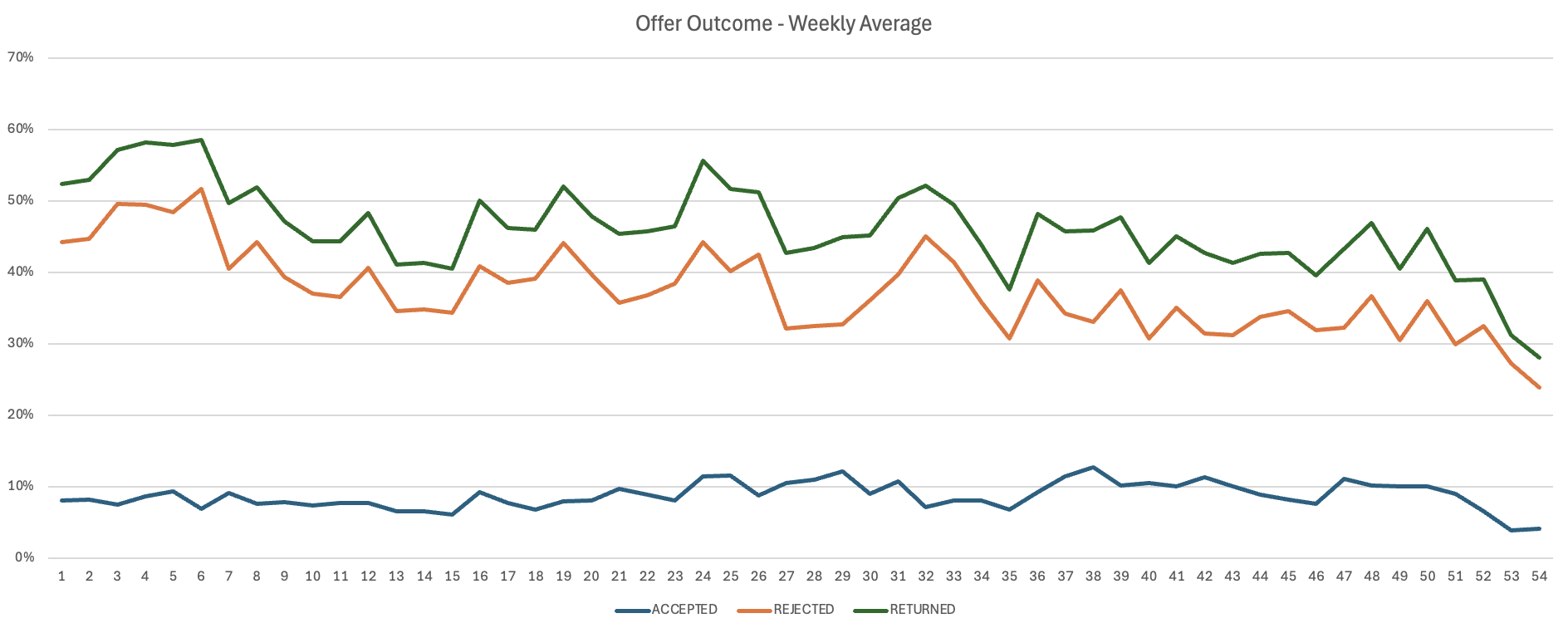
The clearest signal comes from offer outcome metrics. The chart below shows weekly averages of how customers interacted with the offer screen in one Alexa Skill. The three tracked outcomes are accepted, rejected, and returned (the offer screen returned a result to the Skill at all).
 Enlarge
The three values do not add up to 100 percent. The gap represents offers that left the screen without any response being returned to the Alexa Skill, suggesting the offer either failed to deliver or the customer exited without an outcome being recorded. Starting in early January (week 52 in graph), that gap widened significantly and has not recovered.
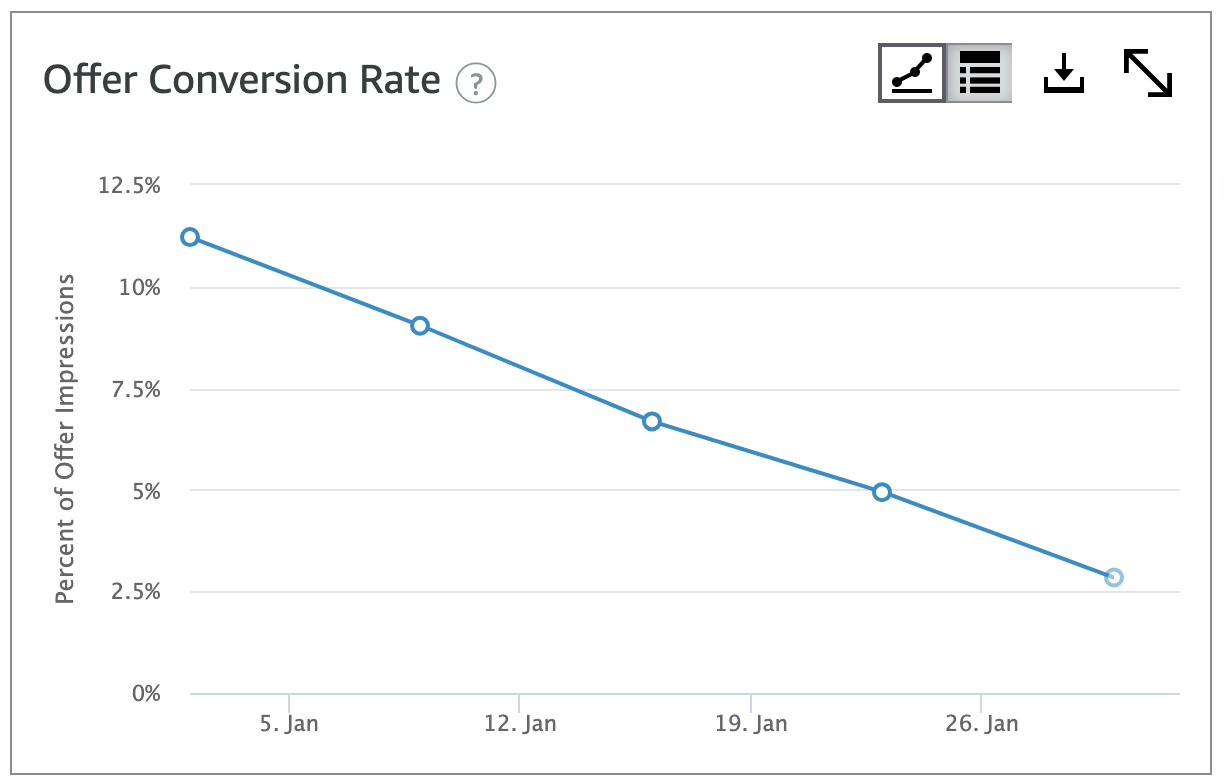
A second view shows the same trend from a different angle. Conversion rates that previously sat consistently above 10 percent have dropped to roughly half of that.
 Enlarge
Multiple Alexa developers in the community have independently reported the same pattern on Echo Show devices.
Why This Matters#
The ISP offer screen is the conversion point. When it does not work well, the impact is direct and measurable: customers who would have purchased do not, and Alexa Skills that depend on ISP revenue see their income drop in proportion.
This is not only a developer problem. Amazon takes a revenue share on every in-skill purchase. When conversion rates drop by half, the loss is shared. For both Alexa developers and Amazon, fixing these issues would restore revenue that was previously flowing through the platform.
For many Alexa developers, including small businesses and full-time operators, ISP revenue funds the time and effort that goes into building and maintaining Alexa Skills. Sustained drops in conversion are not abstract numbers. They affect whether developers can continue investing in the Alexa platform at all.
Open Questions#
Following the principles of this initiative, we frame the unresolved aspects of this situation as questions rather than conclusions:
- 1Given that these issues directly affect revenue on both sides of the ISP relationship, what factors determine how this kind of issue is prioritized?
- 2Three months after the initial reports, the status remains "actively investigating". What does active investigation typically involve, and what would visible progress look like?
- 3The changes to the offer screen appear to have shipped without catching the functional regressions documented above. What is the validation process for changes to revenue-critical surfaces like the ISP checkout?
- 4Would it be possible to roll back the offer screen to its prior state while a permanent fix is developed, given the measurable revenue impact?
- 5How can Alexa developers get visibility into the timeline and status of issues that affect revenue-critical flows?
The Issues Observed#
The issues are not subtle. Here is what has been documented across all generations of Echo Show devices (Echo Show 5, Echo Show 8, Echo Show 11, Echo Show 15, and Echo Show 21).
The microphone does not open during the offer
When the offer screen appears, the microphone does not consistently open for voice input. Customers who try to respond by voice find that nothing happens.
Voice rejection triggers payment friction
When a customer says "no" or "no thanks" to decline the offer, instead of a clean rejection the flow proceeds to ask about a secondary payment method, then often ends with Alexa saying she is "having trouble". The video below shows this sequence.
Reading the button labels does not work reliably
The offer screen shows buttons with text labels that customers should be able to read aloud to confirm or decline. In practice, reading these labels often produces the wrong outcome: the offer prompt is repeated, or an irrelevant response is returned.
The payment-method side panel cannot be dismissed
A side panel for changing the payment method opens during the offer, but tapping outside the panel does not dismiss it. The video below shows the dismiss interaction failing.
The layout is broken across devices
On Echo Show 8, the text on the offer screen is rendered too small and the screen displays with letterboxes. On Echo Show 15 and Echo Show 21, the button design appears off. These cosmetic issues affect how credible and trustworthy the screen looks to a customer about to make a purchase decision.
Crashes mid-prompt
On Echo Show 5 and the new Echo Show 8, customers and developers have reported a crash sequence where Alexa begins the offer prompt, the offer screen never appears, Alexa stops mid-sentence, and the device returns to the home screen. The customer never sees the offer.
The offer screen takes a long time to appear
When the offer prompt begins, the screen itself takes around five seconds to load on the new Echo Show 8. The video below shows the delay.
The spoken prompt itself can also be very long, around twenty seconds depending on the offer terms (discount, free trial, and so on). The combination of slow loading and long prompts creates significant friction at exactly the moment when conversion is most fragile.
Product details are not displayed
The product description and the custom offer prompt that developers provide are no longer shown on the offer screen. The screen displays less information than it did before, even though the underlying product configuration has not changed.
Pre-existing concerns that compound the impact
Some issues with the offer screen are not new. The screen does not show the average customer rating for the product, and the Skill logo appears blurred. These pre-existing factors already affected how credible the offer screen looked to customers, and the recent changes have compounded the problem.
After observing another decline in conversion, we checked the ISP offer screen again. It has changed, and the impact is no longer limited to Echo Show. The same additional confirmation steps have been applied to the voice-only purchase flow on all Alexa devices, including headless Echo devices like the Echo Dot, Echo Pop, and others without a screen. Every in-skill purchase on every Alexa device now requires at least two confirmations to complete.
ISP checkout is now a multi-step process
ISP checkout has turned from a single-step into a two-step confirmation process across all devices. Previously, users could accept an offer with a single tap or a "Yes." Now, after accepting, Alexa asks whether it is OK to use the account's default payment method. A second "Yes" is required to complete the purchase.
On Echo Show devices, additional steps are required. A user must now select the payment method before completing the purchase, turning what used to be a one-tap process into three taps. If a user wants to change the payment method for a purchase, they are prompted to scan a QR code on their phone to update their default payment method. In practice, there no longer appears to be an option to complete an in-skill purchase with a non-default payment method.
Voice input and UI issues continue
The new buttons and their labels still are not voice-activated. Users cannot read them aloud intuitively, and must rely on saying "Yes" or "No." Previously reported issues around microphone behavior persist: the new Echo Show 8 and Echo Show 11 do not open the mic at all during the offer screen, while older devices now open it with a noticeable delay.
Layout and design of the updated offer screens remain visually inconsistent with Alexa+ standards, and the user flow when redirecting back into the Alexa Skill after a purchase attempt continues to behave inconsistently.
The retention problem
These changes introduce additional checkout friction that will further impact conversion rates and monetization for Alexa Skills in Alexa+. But ISP checkout friction is not only a conversion problem. It is a retention problem.
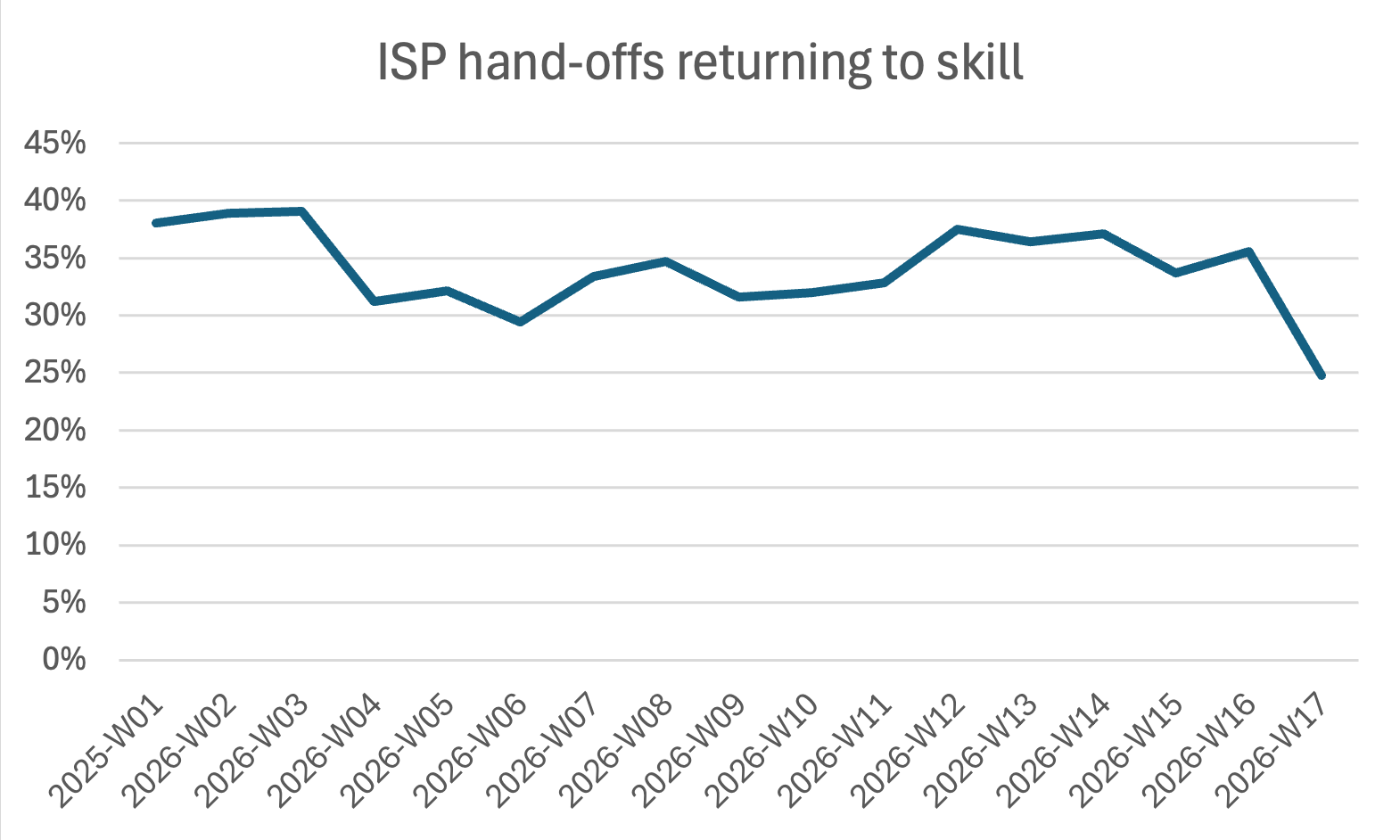
This week, less than 25% of all users who entered the offer screen made it back into the Alexa Skill. A new all-time low.
 Enlarge
When three out of four users who see an offer screen never return to the Alexa Skill, the problem goes beyond lost purchases. It means customers are dropping out of the experience entirely. For Alexa developers, that is lost retention on top of lost revenue.
A second issue has been filed in the community issue tracker to track the additional confirmation steps in the ISP purchase flow, separate from the offer screen issues on Echo Show.
Conversion continues to decline
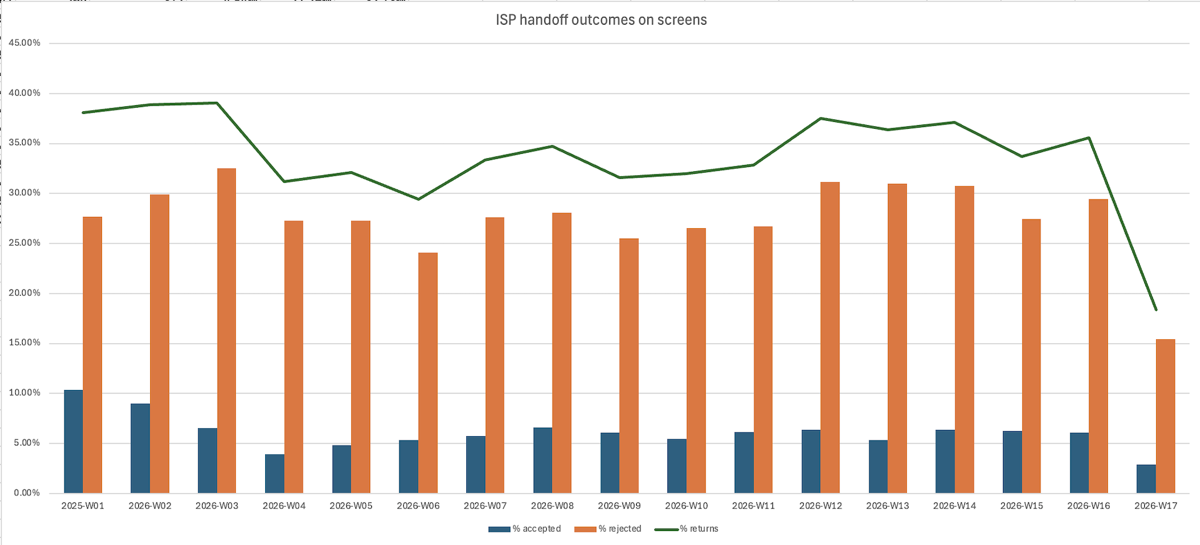
The chart below shows ISP hand-off outcomes on Echo Show devices. Since the additional confirmation steps were introduced, accepted rates have dropped more than 50% week over week. Less than 20% of all users who entered the offer screen made it back into the Alexa Skill, a new all-time low.
 Enlarge
The combination of the offer screen issues first reported in January and the additional confirmation steps now affecting all devices means that the ISP purchase flow has become significantly more difficult to complete across the entire Alexa ecosystem. For Alexa developers who rely on in-skill purchases, these compounding changes continue to reduce both revenue and user retention.
Amazon released a bugfix for the ISP checkout screen on May 5, 2026. After re-testing across devices, the community could not observe any improvement to the issues reported since January. The recordings and notes below were captured after that release and shared with Amazon. The issues are grouped here by how consistently they appear and which devices they affect.
What the re-testing found
- Rendering fails for the offer screen. Frequently observed on all Vega-based devices (Amazon's newer Linux-based Echo platform, distinct from the older Fire OS devices). The offer screen does not draw.
- Offer screen fails to return to the Skill. Occasionally observed across devices, almost exclusively on Vega-based devices. The screen closes without handing a result back to the Alexa Skill.
- Offer screen fails to open the mic. Consistently observed across all Vega-based devices when the ISP offer flow is entered by tapping the screen. The impact is greatest when it combines with a failed render, which is a fairly common case: the offer is read aloud from the home screen with no buttons available to continue by touch, leaving the customer no clear way to proceed.
- Layout and design issues. Not called out in the recordings, but the visual flaws are apparent across all devices and remain inconsistent with Alexa+ design standards.
- Buttons are not voice-activated. Not demonstrated in the recordings. Reading the button labels aloud produces a range of outcomes and rarely completes the intended action.
- Offer screen rendering latency. Consistently observed across all devices, both Vega and Fire OS. The screen takes between five and seven seconds to render.
- Session lifecycle issues. Not shown in the recordings. After returning to the Alexa Skill from the offer screen, voice commands no longer route to the Skill, and Alexa attempts to resolve them instead.
The recordings
The four recordings below were captured after the May 5 release and show that the rendering, microphone, return, and latency issues remain present.
How to Participate#
If you build Alexa Skills with in-skill purchases, your data and observations help strengthen the picture. You can:
- Upvote the offer screen issue tracking the visual and functional regressions
- Upvote the confirmation steps issue tracking the additional purchase confirmation flow
- Add your own observations by commenting with your conversion data, devices affected, or additional symptoms
- File related issues if you are seeing variations not documented here
If you are new to this initiative, our introductory post explains what SkillDevs.io is, how the issue tracker works, and how you can contribute. For additional context on the broader topics where the community is seeking clarity from Amazon, see our nine questions post. For ongoing context on what has moved and what has not, see our monthly progress updates.
This post documents observations from Alexa developers in the community. Metrics shown are from production Skills affected by the issues described.